3D & Hyperrealism
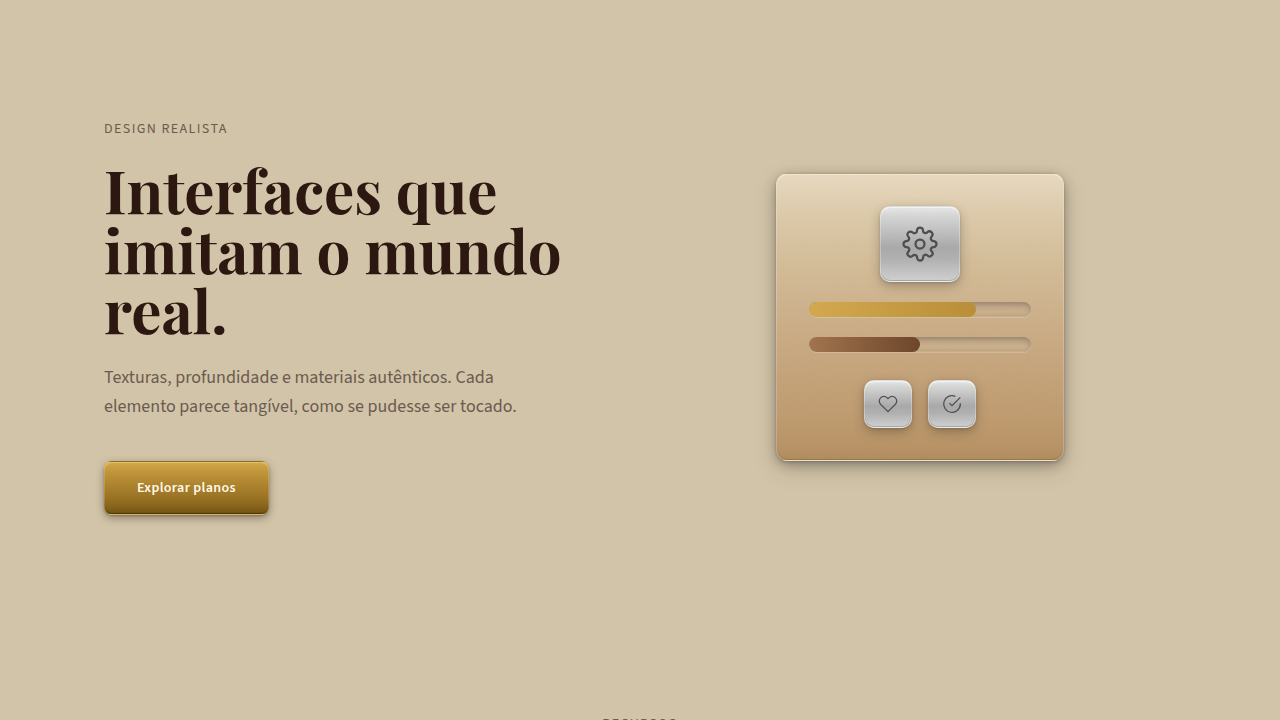
Build an immersive 3D interface using realistic textures, 3D models (Three.js/Babylon.js), complex shadows, realistic lighting, parallax scrolling (3-5 layers), physics-based motion. Ideal for premium e-commerce, real estate, automotive, immersive education. AI-ready template.
Use case: Premium e-commerce, Real estate, Automotive, Immersive education

Historical Context
Remember when iOS 6 had that leather texture on the calendar app? Skeuomorphism died a loud death in 2013, and we spent the next five years in flat design purgatory. Everything was a colored rectangle. But here's the thing: depth never stopped being useful, we just lost the technology to do it well in a browser. WebGL changed that. Three.js made it accessible. By the mid-2010s, agencies were shipping product configurators and architectural walkthroughs that actually ran at 60fps. The gap between "native app experience" and "website" started closing fast. GPU acceleration on mobile caught up around 2019, and suddenly 3D wasn't just a desktop party trick. Now in 2026, Apple Vision Pro and spatial computing have reframed the conversation entirely. We're not asking "should this be 3D?" anymore. We're asking "how does this object exist in space?" The performance cost is real though. You're shipping a rendering engine to every visitor. That's not free, and pretending otherwise is dishonest design.
When to Use
Use 3D when the user needs to understand a physical object before buying it. Cars, furniture, sneakers, apartments. If someone would normally pick it up and rotate it in a store, 3D earns its weight. Don't use it for your SaaS landing page hero just because it looks cool. Every 3D scene adds 200-800KB minimum to your bundle, plus GPU load on devices that might be three years old. If your bounce rate spikes on mobile, the fancy WebGL orb isn't worth it. Be honest about the tradeoff: immersion costs performance.
Design Principles
- Load 3D progressively: show a static image or low-poly placeholder immediately, then swap in the full scene once assets are ready. Never show a blank canvas.
- Respect the device: detect GPU capability and serve appropriate quality levels. A 2023 Android phone is not a MacBook Pro. Degrade gracefully or don't ship it.
- Lighting sells realism more than polygon count. Get your HDRI environment maps and shadow softness right before obsessing over mesh detail.
- Give users control over the camera. Forced animations feel like a tech demo. Let people orbit, zoom, and explore at their own pace.
- Keep interaction patterns familiar: drag to rotate, scroll to zoom, tap to select. Inventing new spatial gestures without onboarding just confuses people.
DESIGN.md
---
version: "alpha"
name: "3D & Hyperrealism"
description: "Build an immersive 3D interface using realistic textures, 3D models (Three.js/Babylon.js), complex shadows, realistic lighting, parallax scrolling (3-5 layers), physics-based motion. Ideal for premium e-commerce, real estate, automotive, immersive education. AI-ready template."
colors:
  primary: "#001F3F"
  secondary: "#228B22"
  tertiary: "#800020"
  neutral: "#FFD700"
  surface: "#C0C0C0"

typography:
  h1:
    fontFamily: -apple-system, sans-serif
    fontSize: 2.25rem
    fontWeight: 700
  body-md:
    fontFamily: -apple-system, sans-serif
    fontSize: 1rem
    fontWeight: 400
  label-caps:
    fontFamily: -apple-system, sans-serif
    fontSize: 0.75rem
    fontWeight: 500
components:
  button-primary:
    backgroundColor: "{colors.primary}"
    textColor: "{colors.neutral}"
    padding: 12px
---

## Overview

Build an immersive 3D interface using realistic textures, 3D models (Three.js/Babylon.js), complex shadows, realistic lighting, parallax scrolling (3-5 layers), physics-based motion. Ideal for premium e-commerce, real estate, automotive, immersive education. AI-ready template. Remember when iOS 6 had that leather texture on the calendar app? Skeuomorphism died a loud death in 2013, and we spent the next five years in flat design purgatory. Everything was a colored rectangle. But here's the thing: depth never stopped being useful, we just lost the technology to do it well in a browser.

WebGL changed that. Three.js made it accessible. By the mid-2010s, agencies were shipping product configurators and architectural walkthroughs that actually ran at 60fps. The gap between "native app experience" and "website" started closing fast. GPU acceleration on mobile caught up around 2019, and suddenly 3D wasn't just a desktop party trick.

Now in 2026, Apple Vision Pro and spatial computing have reframed the conversation entirely. We're not asking "should this be 3D?" anymore. We're asking "how does this object exist in space?" The performance cost is real though. You're shipping a rendering engine to every visitor. That's not free, and pretending otherwise is dishonest design.

- Density: 5/10 — Balanced
- Variance: 4/10 — Moderate
- Motion: 8/10 — Cinematic

- **Style:** Immersive, Realistic, Tactile, Spatial
- **Keywords:** Depth, realistic textures, 3D models, spatial navigation, tactile, skeuomorphic elements, rich detail, immersive
- **Era:** 2020s Modern
- **Light/Dark:** ◐ Partial / ◐ Partial

## Colors

- **Deep Navy** (#001F3F) — Primary surface or dominant color
- **Forest Green** (#228B22) — Secondary surface or text color
- **Burgundy** (#800020) — Supporting palette color
- **Gold** (#FFD700) — Premium accent, decorative highlights
- **Silver** (#C0C0C0) — Supporting palette color


## Typography

- **Display / Hero:** System UI stack (-apple-system, sans-serif) — Weight 700, tight tracking, used for headline impact
- **Body:** System UI stack (-apple-system, sans-serif) — Weight 400, 16px/1.6 line-height, max 72ch per line
- **UI Labels / Captions:** System UI stack (-apple-system, sans-serif) — 0.875rem, weight 500, slight letter-spacing
- **Monospace:** JetBrains Mono — Used for code, metadata, and technical values

Scale:
- Hero: clamp(2.5rem, 5vw, 4rem)
- H1: 2.25rem
- H2: 1.5rem
- Body: 1rem / 1.6
- Small: 0.875rem


## Layout

- **Grid:** CSS Grid primary. Max-width containment: 1280px centered with 1.5rem side padding.
- **Spacing rhythm:** Balanced. Base unit: 0.5rem (8px).
- **Section vertical gaps:** clamp(4rem, 8vw, 8rem).
- **Hero layout:** Split-screen (text left, visual right).
- **Feature sections:** Zig-zag alternating text+image rows. No 3-equal-columns.
- **Mobile collapse:** All multi-column layouts collapse below 768px. No horizontal overflow.
- **z-index contract:** base (0) / sticky-nav (100) / overlay (200) / modal (300) / toast (500).


## Elevation & Depth

WebGL/Three.js 3D, realistic shadows (layers), physics lighting, parallax (3-5 layers), smooth 3D (300-400ms)

- **Physics:** Spring — stiffness 120, damping 20. Confident, weighted transitions.
- **Entry animations:** Fade + translate-Y (16px → 0) over 540ms ease-out. Staggered cascades for lists: 120ms between items.
- **Hover states:** Scale(1.03) + shadow lift over 200ms.
- **Page transitions:** Fade + slide (300ms).
- **Performance:** Only transform and opacity animated. No layout-triggering properties.


## Shapes

Base corner radius: 4px. See rounded tokens in front matter for the full scale.

## Components

- **Primary Button:** Subtly rounded (0.5rem) shape. Accent color fill. Hover: 8% darken + subtle lift shadow. Active: -1px translate tactile press. Font weight 600. No outer glows.
- **Secondary / Ghost Button:** Outline variant. 1.5px border in muted color. Text in primary color. Hover: subtle background fill.
- **Cards:** Subtly rounded (0.5rem) corners. Surface background. Subtle shadow (0 2px 12px rgba(0,0,0,0.06)). 1px border stroke.
- **Inputs:** Label above input. 1px border stroke. Focus ring: 2px accent color offset 2px. Error text below in semantic red. No floating labels.
- **Navigation:** Primary surface background. Active item: accent color indicator. Font weight 500 when active.
- **Skeletons:** Shimmer animation matching component dimensions. No circular spinners.
- **Empty States:** Icon-based composition with descriptive text and action button.


## Do's and Don'ts

- No emojis in UI — use icon system only (Lucide, Heroicons)
- No pure black (#000000) — use off-black or charcoal variants
- No oversaturated accent colors (saturation cap: 80%)
- No 3-column equal-width feature layouts — use zig-zag or asymmetric grid
- No `h-screen` — use `min-h-[100dvh]`
- No AI copywriting clichés: "Elevate", "Seamless", "Unleash", "Next-Gen"
- No broken external image links — use picsum.photos or inline SVG
- No generic lorem ipsum in demos

- Do WebGL/Three.js integrated
- Do 3D models loaded
- Do Parallax 3-5 layers
- Do Realistic lighting verified
- Do Complex shadows rendered
- Do Physics animation smooth 300-400ms


## Use Case

Premium e-commerce, Real estate, Automotive, Immersive education
Technical Specs
CSS
transform: translate3d, perspective: 1000px, WebGL canvas, Three.js/Babylon.js library, box-shadow: complex multi-layer, background: complex gradients, filter: drop-shadow()
Variables
--perspective: 1000px, --parallax-layers: 5, --lighting-intensity: realistic, --shadow-depth: 20-40%, --animation-duration: 300-400ms
Checklist
☐ WebGL/Three.js integrated, ☐ 3D models loaded, ☐ Parallax 3-5 layers, ☐ Realistic lighting verified, ☐ Complex shadows rendered, ☐ Physics animation smooth 300-400ms
Colors
Primary
Effects
WebGL/Three.js 3D, realistic shadows (layers), physics lighting, parallax (3-5 layers), smooth 3D (300-400ms)
Light/Dark
◐ Partial / ◐ Partial
AI Prompt
Act as a Senior Frontend Engineer and Expert UI Designer.
Your task is to code a complete Landing Page on the first attempt.
- Landing Page Theme: <INSERT THEME>
- Sections to add: <INSERT SECTIONS>

Generate the final code immediately following these definitions:

## Style

- **Name:** 3D & Hyperrealism
- **Type:** Immersive, Realistic, Tactile, Spatial
- **Keywords:** Depth, realistic textures, 3D models, spatial navigation, tactile, skeuomorphic elements, rich detail, immersive
- **Era:** 2020s Modern
- **Light/Dark:** ◐ Partial / ◐ Partial

## Color Palette

- **Primary:** Deep Navy #001F3F, Forest Green #228B22, Burgundy #800020, Gold #FFD700, Silver #C0C0C0
- **Secondary:** Complex gradients (5-10 stops), realistic lighting, shadow variations (20-40% darker)

## Visual Effects

WebGL/Three.js 3D, realistic shadows (layers), physics lighting, parallax (3-5 layers), smooth 3D (300-400ms)

## AI Visual Direction

Build an immersive 3D interface using realistic textures, 3D models (Three.js/Babylon.js), complex shadows, realistic lighting, parallax scrolling (3-5 layers), physics-based motion. Include skeuomorphic elements with tactile detail.

## CSS Technical

```css
transform: translate3d, perspective: 1000px, WebGL canvas, Three.js/Babylon.js library, box-shadow: complex multi-layer, background: complex gradients, filter: drop-shadow()
```

## Design System Variables

```css
--perspective: 1000px, --parallax-layers: 5, --lighting-intensity: realistic, --shadow-depth: 20-40%, --animation-duration: 300-400ms
```

## Implementation Checklist

- ☐ WebGL/Three.js integrated
- ☐ 3D models loaded
- ☐ Parallax 3-5 layers
- ☐ Realistic lighting verified
- ☐ Complex shadows rendered
- ☐ Physics animation smooth 300-400ms

## Execution Rules

1. Strictly follow the defined visual style.
2. Use high-quality inline SVG icons (Heroicons or Lucide style) — NEVER use emojis as icons.
3. Add `cursor-pointer` and smooth `hover` states (transition-all) on all interactive elements.
4. Required Page Structure:
   - Navbar (Logo + Links + CTA)
   - Hero Section (Impactful Headline + Subtitle + 2 buttons + 3D/Abstract visual element via CSS)
   - Features (3 cards with icons)
   - Testimonials (3 cards)
   - Pricing (3 tiers, highlight the middle one)
   - Final CTA
   - Full Footer with social links, privacy policy, terms of use, contact and SEO links.
5. All text content must be in English.
6. The visual must be CLEARLY distinct — do not create a "default Bootstrap" design. Force the use of the provided design system variables.
7. Use `<style>` tags in the head for custom classes (especially for complex backdrop-filter effects and animations) that Tailwind CDN doesn't cover.
8. Full Responsiveness: Layout must adapt perfectly to Mobile, Tablet and Desktop (vertical stack on mobile).
9. Include basic SEO, Viewport and Open Graph meta tags in `<head>`.
10. Footer must contain: Copyright 2026, Secondary navigation links and Social media icons.
11. Make the creative decisions needed to deliver the complete, functional result now.
Related

Last synced: 4/1/2026