Hacker Aesthetic CRT/CLI
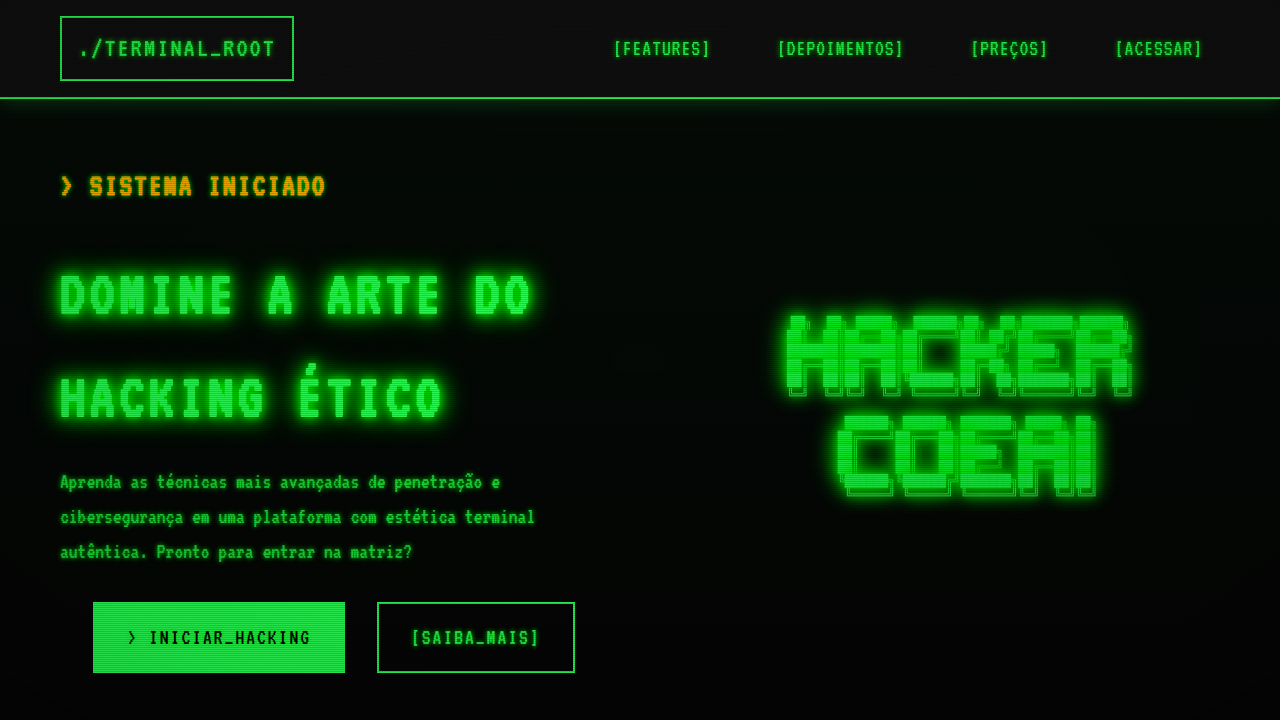
Hacker style landing page, terminal ui, crt monitor effect, green text on black, ascii art, command line interface, retro coding. Ideal for landing pages, modern websites. AI-ready template.
Use case: Landing pages, Modern websites
Historical Context
The green-on-black terminal didn't start as an aesthetic choice. It was phosphor. P1 phosphor monitors glowed green because that's what the chemistry allowed — and an entire visual language was born from hardware limitation. Then Hollywood got hold of it. The Matrix (1999) turned cascading green katakana into a cultural icon. Suddenly, scrolling monospace text meant you were *in* the machine. Mr. Robot doubled down fifteen years later — Elliot's terminal wasn't decoration, it was character. The show's creators hired actual hackers to make the screens real, and audiences learned to read nmap output as dramatic tension. That mattered. Now we're in a CLI renaissance. Developers are building beautiful terminal tools — Warp, Fig, charm.sh — because the command line never actually lost. It just waited for designers to show up. The hacker aesthetic isn't nostalgia anymore. It's a living design language that signals competence, speed, and zero tolerance for fluff. When you see monospace green on black, you know: this thing does real work.
When to Use
Deploy this when your audience self-identifies as technical. Security dashboards, penetration testing tools, CTF platforms, developer CLIs, status pages for infrastructure products. It works when credibility matters more than approachability — when looking 'friendly' would actually undermine trust. Also strong for hacker culture brands, cybersecurity startups, and any product where the user would rather read a man page than watch a tutorial video. Avoid it for consumer products. Regular people find terminals intimidating, and that's the point.
Design Principles
- Monospace is non-negotiable — proportional fonts break the illusion instantly. Pick one with personality: JetBrains Mono, Berkeley Mono, IBM Plex Mono.
- Scanline texture and CRT glow should whisper, never shout. A 2% opacity overlay and subtle text-shadow is atmosphere. More than that is a costume.
- Color palette stays brutally minimal — one accent hue (green, amber, or cyan) against near-black. Every additional color needs to earn its place like a CLI flag.
- Animation mimics real terminal behavior: character-by-character rendering, blinking cursors, stdout streaming. Never ease-in-out. Never bounce. Machines don't bounce.
- Information density is a feature. Embrace tight line-height, dense layouts, and visible data. White space is for marketing sites — this aesthetic rewards people who can parse.
DESIGN.md
---
version: "alpha"
name: "Hacker Aesthetic CRT/CLI"
description: "Hacker style landing page, terminal ui, crt monitor effect, green text on black, ascii art, command line interface, retro coding. Ideal for landing pages, modern websites. AI-ready template."
colors:
  primary: "#050505"
  secondary: "#2CFF56"
  tertiary: "#FFB200"
  neutral: "#111111"
  surface: "#FF3333"
  accent: "#FFFFFF"
typography:
  h1:
    fontFamily: VT323
    fontSize: 2.5rem
    fontWeight: 700
  body-md:
    fontFamily: VT323
    fontSize: 1rem
    fontWeight: 400
components:
  button-primary:
    backgroundColor: "{colors.primary}"
    textColor: "{colors.neutral}"
    padding: 12px
---

## Overview

Hacker style landing page, terminal ui, crt monitor effect, green text on black, ascii art, command line interface, retro coding. Ideal for landing pages, modern websites. AI-ready template. The green-on-black terminal didn't start as an aesthetic choice. It was phosphor. P1 phosphor monitors glowed green because that's what the chemistry allowed — and an entire visual language was born from hardware limitation. Then Hollywood got hold of it.

The Matrix (1999) turned cascading green katakana into a cultural icon. Suddenly, scrolling monospace text meant you were *in* the machine. Mr. Robot doubled down fifteen years later — Elliot's terminal wasn't decoration, it was character. The show's creators hired actual hackers to make the screens real, and audiences learned to read nmap output as dramatic tension. That mattered.

Now we're in a CLI renaissance. Developers are building beautiful terminal tools — Warp, Fig, charm.sh — because the command line never actually lost. It just waited for designers to show up. The hacker aesthetic isn't nostalgia anymore. It's a living design language that signals competence, speed, and zero tolerance for fluff. When you see monospace green on black, you know: this thing does real work.

- Density: 8/10 — Dense
- Variance: 4/10 — Moderate
- Motion: 4/10 — Subtle

- **Style:** Technical, Nostalgic, Cryptic
- **Keywords:** hacker, terminal, cli, crt, coding, matrix, green, retro, command line
- **Era:** Retro Tech
- **Light/Dark:** ✗ No / ✓ Full

## Colors

- **Background** (#050505) — Primary background surface
- **Text** (#2CFF56) — Primary text color
- **Accent** (#FFB200) — Primary accent, CTAs and interactive elements
- **Dark Grey** (#111111) — Deep contrast surface
- **Error Red** (#FF3333) — Error states, destructive actions
- **Cursor White** (#FFFFFF) — Secondary surface


## Typography

- **Display / Hero:** VT323 — Weight 700, tight tracking, used for headline impact
- **Body:** VT323 — Weight 400, 16px/1.6 line-height, max 72ch per line
- **UI Labels / Captions:** VT323 — 0.875rem, weight 500, slight letter-spacing
- **Monospace:** JetBrains Mono — Used for code, metadata, and technical values

Scale:
- Hero: clamp(2.5rem, 5vw, 4rem)
- H1: 2.25rem
- H2: 1.5rem
- Body: 1rem / 1.6
- Small: 0.875rem


## Layout

- **Grid:** CSS Grid primary. Max-width containment: 1280px centered with 1.5rem side padding.
- **Spacing rhythm:** Balanced. Base unit: 0.5rem (8px).
- **Section vertical gaps:** clamp(4rem, 8vw, 8rem).
- **Hero layout:** Split-screen (text left, visual right).
- **Feature sections:** Zig-zag alternating text+image rows. No 3-equal-columns.
- **Mobile collapse:** All multi-column layouts collapse below 768px. No horizontal overflow.
- **z-index contract:** base (0) / sticky-nav (100) / overlay (200) / modal (300) / toast (500).


## Elevation & Depth

ASCII ART, pixel-art iconography, binary rain data streams, CRT monitor phosphor glow, scanlines, digital noise.

- **Physics:** Ease-out curves, 200-300ms duration. Smooth and predictable.
- **Entry animations:** Fade + translate-Y (16px → 0) over 420ms ease-out. Staggered cascades for lists: 80ms between items.
- **Hover states:** Subtle color shift + shadow adjustment over 200ms.
- **Page transitions:** Fade only (200ms).
- **Performance:** Only transform and opacity animated. No layout-triggering properties.


## Shapes

Base corner radius: 8px. See rounded tokens in front matter for the full scale.


## Components

- **Primary Button:** Subtly rounded (0.5rem) shape. Accent color fill. Hover: 8% darken + subtle lift shadow. Active: -1px translate tactile press. Font weight 600. No outer glows.
- **Secondary / Ghost Button:** Outline variant. 1.5px border in muted color. Text in primary color. Hover: subtle background fill.
- **Cards:** Subtly rounded (0.5rem) corners. Surface background. Subtle shadow (0 2px 12px rgba(0,0,0,0.06)). 1px border stroke.
- **Inputs:** Label above input. 1px border stroke. Focus ring: 2px accent color offset 2px. Error text below in semantic red. No floating labels.
- **Navigation:** Primary surface background. Active item: accent color indicator. Font weight 500 when active.
- **Skeletons:** Shimmer animation matching component dimensions. No circular spinners.
- **Empty States:** Icon-based composition with descriptive text and action button.


## Do's and Don'ts

- No emojis in UI — use icon system only (Lucide, Heroicons)
- No pure black (#000000) — use off-black or charcoal variants
- No oversaturated accent colors (saturation cap: 80%)
- No 3-column equal-width feature layouts — use zig-zag or asymmetric grid
- No `h-screen` — use `min-h-[100dvh]`
- No AI copywriting clichés: "Elevate", "Seamless", "Unleash", "Next-Gen"
- No broken external image links — use picsum.photos or inline SVG
- No generic lorem ipsum in demos

- Do Black terminal background
- Do Bright Green/Amber monospace text
- Do CRT scanline overlay
- Do Typing animations
- Do ASCII art elements


## Use Case

Landing pages, Modern websites
Technical Specs
CSS
background-color: #050505; color: #2CFF56; font-family: 'VT323', monospace; text-shadow: 2px 2px 4px #00FF00; border-left: 5px solid #2CFF56;
Variables
--bg-terminal: #050505, --text-phosphor: #2CFF56, --alert-amber: #FFB200, --scanline: rgba(0,0,0,0.5), --font-term: 'VT323', monospace
Checklist
☐ Black terminal background, ☐ Bright Green/Amber monospace text, ☐ CRT scanline overlay, ☐ Typing animations, ☐ ASCII art elements
Colors
Primary
Secondary
Effects
ASCII ART, pixel-art iconography, binary rain data streams, CRT monitor phosphor glow, scanlines, digital noise.
Light/Dark
✗ No / ✓ Full
AI Prompt
Act as a Senior Frontend Engineer and Expert UI Designer.
Your task is to code a complete Landing Page on the first attempt.
- Landing Page Theme: <INSERT THEME>
- Sections to add: <INSERT SECTIONS>

Generate the final code immediately following these definitions:

## Style

- **Name:** Hacker Aesthetic CRT/CLI
- **Type:** Technical, Nostalgic, Cryptic
- **Keywords:** hacker, terminal, cli, crt, coding, matrix, green, retro, command line
- **Era:** Retro Tech
- **Light/Dark:** ✗ No / ✓ Full

## Color Palette

- **Primary:** Background #050505, Text #2CFF56, Accent #FFB200
- **Secondary:** Dark Grey #111111, Error Red #FF3333, Cursor White #FFFFFF

## Visual Effects

ASCII ART, pixel-art iconography, binary rain data streams, CRT monitor phosphor glow, scanlines, digital noise.

## AI Visual Direction

hacker style landing page, terminal ui, crt monitor effect, green text on black, ascii art, command line interface, retro coding.

## CSS Technical

```css
background-color: #050505; color: #2CFF56; font-family: 'VT323', monospace; text-shadow: 2px 2px 4px #00FF00; border-left: 5px solid #2CFF56;
```

## Design System Variables

```css
--bg-terminal: #050505, --text-phosphor: #2CFF56, --alert-amber: #FFB200, --scanline: rgba(0,0,0,0.5), --font-term: 'VT323', monospace
```

## Implementation Checklist

- ☐ Black terminal background
- ☐ Bright Green/Amber monospace text
- ☐ CRT scanline overlay
- ☐ Typing animations
- ☐ ASCII art elements

## Execution Rules

1. Strictly follow the defined visual style.
2. Use high-quality inline SVG icons (Heroicons or Lucide style) — NEVER use emojis as icons.
3. Add `cursor-pointer` and smooth `hover` states (transition-all) on all interactive elements.
4. Required Page Structure:
   - Navbar (Logo + Links + CTA)
   - Hero Section (Impactful Headline + Subtitle + 2 buttons + 3D/Abstract visual element via CSS)
   - Features (3 cards with icons)
   - Testimonials (3 cards)
   - Pricing (3 tiers, highlight the middle one)
   - Final CTA
   - Full Footer with social links, privacy policy, terms of use, contact and SEO links.
5. All text content must be in English.
6. The visual must be CLEARLY distinct — do not create a "default Bootstrap" design. Force the use of the provided design system variables.
7. Use `<style>` tags in the head for custom classes (especially for complex backdrop-filter effects and animations) that Tailwind CDN doesn't cover.
8. Full Responsiveness: Layout must adapt perfectly to Mobile, Tablet and Desktop (vertical stack on mobile).
9. Include basic SEO, Viewport and Open Graph meta tags in `<head>`.
10. Footer must contain: Copyright 2026, Secondary navigation links and Social media icons.
11. Make the creative decisions needed to deliver the complete, functional result now.
Related
Last synced: 4/1/2026