VoltAgent Terminal Emerald
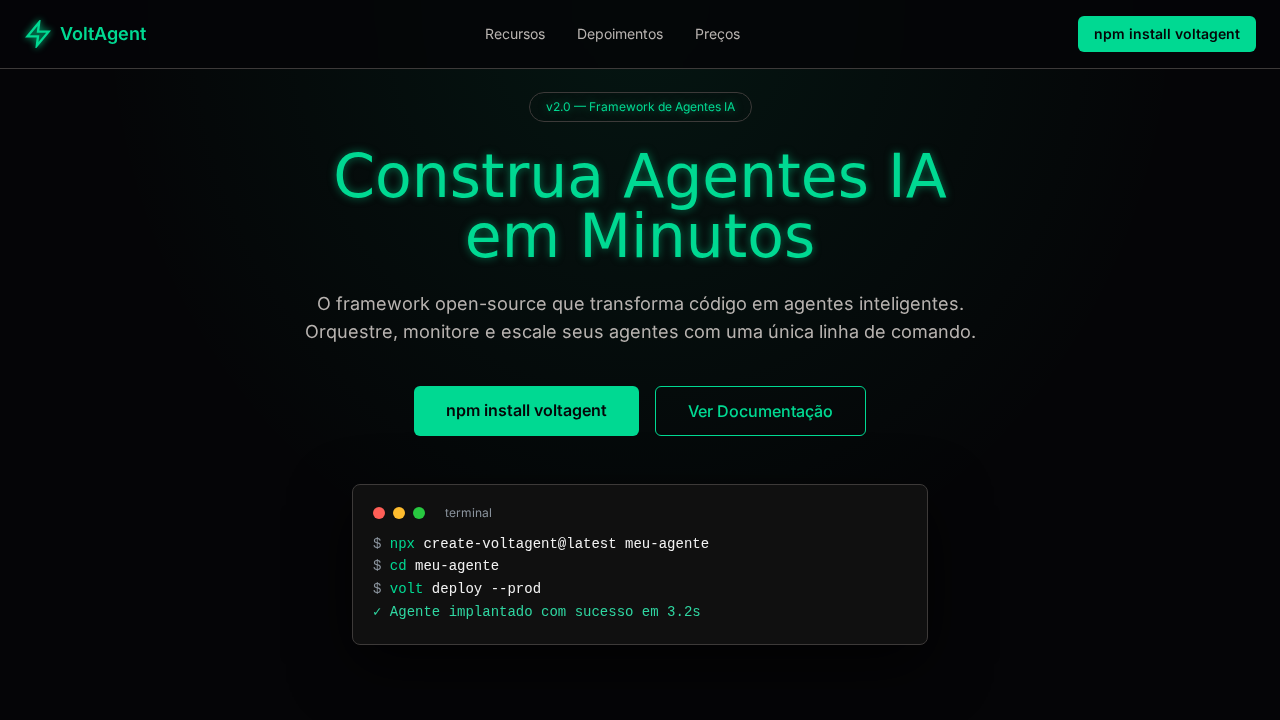
VoltAgent-inspired deep-space terminal landing page. Ideal for frameworks de agentes ai, plataformas de engenharia, ferramentas de automação, sdks. AI-ready template.
Use case: AI agent frameworks, Engineering platforms, Automation tools, SDKs
Historical Context
Terminal green didn't start as an aesthetic choice — it was a phosphor limitation. P1 phosphor tubes in the 1970s emitted that specific green because it was cheap, efficient, and easy on the eyes during marathon coding sessions. The color became inseparable from the idea of "real computing" — the stuff happening beneath the GUI layer, where text commands moved faster than any mouse ever could. VoltAgent Terminal Emerald reclaims that lineage with intent. It's not nostalgic cosplay. The emerald here is saturated, electric, pushed toward cyan in ways old CRTs never managed. It speaks to a new generation of terminal-native tools — AI agent frameworks, orchestration layers, CLI-first developer experiences — that demand visual identity beyond default system fonts on black backgrounds. The futuristic angle isn't about adding chrome; it's about acknowledging that the terminal is evolving into something more autonomous, more alive. This palette lands in the gap between retro-terminal kitsch and sterile modern dark themes. It has temperature. It has voltage.
When to Use
Deploy this when building interfaces for AI agent frameworks, developer CLIs, or any tool where the terminal metaphor carries meaning — not decoration. It works for dashboards monitoring autonomous processes, command-line product marketing sites, and documentation that needs to feel like it belongs to engineers who ship at 2am. Avoid it for consumer-facing products or anything requiring warmth and approachability. This palette is deliberately cold, precise, and technical.
Design Principles
- Emerald as signal, not decoration — every green element should communicate state, activity, or system responsiveness
- Monospace typography is structural, not stylistic — use it to enforce alignment, hierarchy through indentation, and machine-readable rhythm
- Dark backgrounds earn contrast — pure black (#000) is lazy; use deep charcoals (0A0A0A–121212) that let the emerald breathe without floating
- Motion implies computation — animations should feel like processes completing, cursors blinking, data streaming — never bouncy or playful
- Density is a feature — terminal users expect information-rich layouts; whitespace is measured in line-heights, not viewport percentages
DESIGN.md
---
version: "alpha"
name: "VoltAgent Terminal Emerald"
description: "VoltAgent-inspired deep-space terminal landing page. Ideal for frameworks de agentes ai, plataformas de engenharia, ferramentas de automação, sdks. AI-ready template."
colors:
  primary: "#050507"
  secondary: "#101010"
  tertiary: "#00d992"
  neutral: "#f2f2f2"
  surface: "#2fd6a1"
  accent: "#3d3a39"
typography:
  h1:
    fontFamily: system-ui for headings
    fontSize: 2.25rem
    fontWeight: 700
  body-md:
    fontFamily: system-ui for headings
    fontSize: 1rem
    fontWeight: 400
  label-caps:
    fontFamily: system-ui for headings
    fontSize: 0.75rem
    fontWeight: 500
rounded:
  sm: 8px
  md: 16px
  lg: 24px
components:
  button-primary:
    backgroundColor: "{colors.primary}"
    textColor: "{colors.neutral}"
    rounded: "{rounded.sm}"
    padding: 12px
---

## Overview

VoltAgent-inspired deep-space terminal landing page. Ideal for frameworks de agentes ai, plataformas de engenharia, ferramentas de automação, sdks. AI-ready template. Terminal green didn't start as an aesthetic choice — it was a phosphor limitation. P1 phosphor tubes in the 1970s emitted that specific green because it was cheap, efficient, and easy on the eyes during marathon coding sessions. The color became inseparable from the idea of "real computing" — the stuff happening beneath the GUI layer, where text commands moved faster than any mouse ever could.

VoltAgent Terminal Emerald reclaims that lineage with intent. It's not nostalgic cosplay. The emerald here is saturated, electric, pushed toward cyan in ways old CRTs never managed. It speaks to a new generation of terminal-native tools — AI agent frameworks, orchestration layers, CLI-first developer experiences — that demand visual identity beyond default system fonts on black backgrounds. The futuristic angle isn't about adding chrome; it's about acknowledging that the terminal is evolving into something more autonomous, more alive.

This palette lands in the gap between retro-terminal kitsch and sterile modern dark themes. It has temperature. It has voltage.

- Density: 8/10 — Dense
- Variance: 4/10 — Moderate
- Motion: 8/10 — Cinematic

- **Style:** Deep-Space Terminal, Emerald Signal, Warm Charcoal Borders, Code-First, Glow Effects
- **Keywords:** voltagent, terminal, emerald, deep-space, glow effects, warm charcoal, code-first, npm install, system-ui headings, Inter body
- **Era:** 2024-2026 AI Agent Engineering
- **Light/Dark:** ✗ Not Recommended / ✓ Full

## Colors

- **Abyss Black** (#050507) — Dark surface, primary background
- **Carbon** (#101010) — Secondary surface or text color
- **Verde Sinal** (#00d992) — Supporting palette color
- **Snow White** (#f2f2f2) — Light surface, card backgrounds
- **Mint** (#2fd6a1) — Extended palette, decorative use
- **Charcoal Quente** (#3d3a39) — Deep contrast surface
- **Parchment** (#b8b3b0) — Extended palette, decorative use
- **Steel** (#8b949e) — Extended palette, decorative use


## Typography

- **Display / Hero:** system-ui for headings — Weight 700, tight tracking, used for headline impact
- **Body:** system-ui for headings — Weight 400, 16px/1.6 line-height, max 72ch per line
- **UI Labels / Captions:** system-ui for headings — 0.875rem, weight 500, slight letter-spacing
- **Monospace:** JetBrains Mono — Used for code, metadata, and technical values

Scale:
- Hero: clamp(2.5rem, 5vw, 4rem)
- H1: 2.25rem
- H2: 1.5rem
- Body: 1rem / 1.6
- Small: 0.875rem


## Layout

- **Grid:** CSS Grid primary. Max-width containment: 1280px centered with 1.5rem side padding.
- **Spacing rhythm:** Balanced. Base unit: 0.5rem (8px).
- **Section vertical gaps:** clamp(4rem, 8vw, 8rem).
- **Hero layout:** Split-screen (text left, visual right).
- **Feature sections:** Zig-zag alternating text+image rows. No 3-equal-columns.
- **Mobile collapse:** All multi-column layouts collapse below 768px. No horizontal overflow.
- **z-index contract:** base (0) / sticky-nav (100) / overlay (200) / modal (300) / toast (500).


## Elevation & Depth

Canvas carbon-black (#050507) com bordas warm charcoal (#3d3a39). Verde sinal (#00d992) como única energia cromática — brilha de headlines, bordas e elementos interativos como circuito. Efeitos de glow via drop-shadow pulsante (0 0 2px → 0 0 8px #00d992). Sombra dramática profunda (rgba(0,0,0,0.7) 0px 20px 60px). Code snippets como conteúdo hero. npm install como CTA principal. Cinzas quentes (#3d3a39, #8b949e, #b8b3b0) prevenindo frieza clínica.

- **Physics:** Spring — stiffness 120, damping 20. Confident, weighted transitions.
- **Entry animations:** Fade + translate-Y (16px → 0) over 540ms ease-out. Staggered cascades for lists: 120ms between items.
- **Hover states:** Scale(1.03) + shadow lift over 200ms.
- **Page transitions:** Fade + slide (300ms).
- **Performance:** Only transform and opacity animated. No layout-triggering properties.


## Shapes

Base corner radius: 8px. See rounded tokens in front matter for the full scale.


## Components

- **Primary Button:** Rounded (8px cards) shape. Accent color fill. Hover: 8% darken + subtle lift shadow. Active: -1px translate tactile press. Font weight 600. No outer glows.
- **Secondary / Ghost Button:** Outline variant. 1.5px border in muted color. Text in primary color. Hover: subtle background fill.
- **Cards:** Rounded (8px cards) corners. Surface background. Subtle shadow (0 2px 12px rgba(0,0,0,0.06)). 1px border stroke.
- **Inputs:** Label above input. 1px border stroke. Focus ring: 2px accent color offset 2px. Error text below in semantic red. No floating labels.
- **Navigation:** Primary surface background. Active item: accent color indicator. Font weight 500 when active.
- **Skeletons:** Shimmer animation matching component dimensions. No circular spinners.
- **Empty States:** Icon-based composition with descriptive text and action button.


## Do's and Don'ts

- No emojis in UI — use icon system only (Lucide, Heroicons)
- No pure black (#000000) — use off-black or charcoal variants
- No oversaturated accent colors (saturation cap: 80%)
- No 3-column equal-width feature layouts — use zig-zag or asymmetric grid
- No `h-screen` — use `min-h-[100dvh]`
- No AI copywriting clichés: "Elevate", "Seamless", "Unleash", "Next-Gen"
- No broken external image links — use picsum.photos or inline SVG
- No generic lorem ipsum in demos

- Do Canvas carbon-black #050507
- Do Verde sinal #00d992 como única cor
- Do Glow pulsante
- Do Sombras dramáticas profundas
- Do Code como hero
- Do Bordas warm charcoal
- Do Cinzas quentes
- Do Responsivo


## Use Case

AI agent frameworks, Engineering platforms, Automation tools, SDKs
Technical Specs
CSS
background: #050507; color: #f2f2f2; accent: #00d992; border: 1px solid #3d3a39; filter: drop-shadow(0 0 8px #00d992); box-shadow: rgba(0,0,0,0.7) 0px 20px 60px; font-family: system-ui for headings, Inter for body, SFMono-Regular for code; border-radius: 8px cards, 6px buttons
Variables
--bg: #050507; --surface: #101010; --text: #f2f2f2; --accent: #00d992; --mint: #2fd6a1; --border: #3d3a39; --text-secondary: #b8b3b0; --text-tertiary: #8b949e; --glow: drop-shadow(0 0 8px #00d992); --radius: 8px
Checklist
☐ Canvas carbon-black #050507, ☐ Verde sinal #00d992 como única cor, ☐ Glow pulsante, ☐ Sombras dramáticas profundas, ☐ Code como hero, ☐ Bordas warm charcoal, ☐ Cinzas quentes, ☐ Responsivo
Colors
Primary
Secondary
Effects
Canvas carbon-black (#050507) com bordas warm charcoal (#3d3a39). Verde sinal (#00d992) como única energia cromática — brilha de headlines, bordas e elementos interativos como circuito. Efeitos de glow via drop-shadow pulsante (0 0 2px → 0 0 8px #00d992). Sombra dramática profunda (rgba(0,0,0,0.7) 0px 20px 60px). Code snippets como conteúdo hero. npm install como CTA principal. Cinzas quentes (#3d3a39, #8b949e, #b8b3b0) prevenindo frieza clínica.
Light/Dark
✗ Not Recommended / ✓ Full
AI Prompt
Act as a Senior Frontend Engineer and Expert UI Designer.
Your task is to code a complete Landing Page on the first attempt.
- Landing Page Theme: <INSERT THEME>
- Sections to add: <INSERT SECTIONS>

Generate the final code immediately following these definitions:

## Style

- **Name:** VoltAgent Terminal Emerald
- **Type:** Deep-Space Terminal, Emerald Signal, Warm Charcoal Borders, Code-First, Glow Effects
- **Keywords:** voltagent, terminal, emerald, deep-space, glow effects, warm charcoal, code-first, npm install, system-ui headings, Inter body
- **Era:** 2024-2026 AI Agent Engineering
- **Light/Dark:** ✗ Not Recommended / ✓ Full

## Color Palette

- **Primary:** Abyss Black #050507, Carbon #101010, Verde Sinal #00d992, Snow White #f2f2f2
- **Secondary:** Mint #2fd6a1, Charcoal Quente #3d3a39, Parchment #b8b3b0, Steel #8b949e

## Visual Effects

Canvas carbon-black (#050507) com bordas warm charcoal (#3d3a39). Verde sinal (#00d992) como única energia cromática — brilha de headlines, bordas e elementos interativos como circuito. Efeitos de glow via drop-shadow pulsante (0 0 2px → 0 0 8px #00d992). Sombra dramática profunda (rgba(0,0,0,0.7) 0px 20px 60px). Code snippets como conteúdo hero. npm install como CTA principal. Cinzas quentes (#3d3a39, #8b949e, #b8b3b0) prevenindo frieza clínica.

## AI Visual Direction

Design a VoltAgent-inspired deep-space terminal landing page. Carbon-black canvas (#050507) with warm charcoal borders (#3d3a39). Emerald Signal Green (#00d992) as sole chromatic energy — glowing from headlines, borders, interactive elements. Pulsing glow effects via drop-shadow cycling 2px-8px. Deep dramatic shadows (rgba(0,0,0,0.7) 0px 20px 60px). Code snippets as hero content. system-ui for headings at 60px weight 400 line-height 1.0. Inter for body. Warm neutral grays preventing clinical feel.

## CSS Technical

```css
background: #050507; color: #f2f2f2; accent: #00d992; border: 1px solid #3d3a39; filter: drop-shadow(0 0 8px #00d992); box-shadow: rgba(0,0,0,0.7) 0px 20px 60px; font-family: system-ui for headings, Inter for body, SFMono-Regular for code; border-radius: 8px cards, 6px buttons
```

## Design System Variables

```css
--bg: #050507; --surface: #101010; --text: #f2f2f2; --accent: #00d992; --mint: #2fd6a1; --border: #3d3a39; --text-secondary: #b8b3b0; --text-tertiary: #8b949e; --glow: drop-shadow(0 0 8px #00d992); --radius: 8px
```

## Implementation Checklist

- ☐ Canvas carbon-black #050507
- ☐ Verde sinal #00d992 como única cor
- ☐ Glow pulsante
- ☐ Sombras dramáticas profundas
- ☐ Code como hero
- ☐ Bordas warm charcoal
- ☐ Cinzas quentes
- ☐ Responsivo

## Execution Rules

1. Strictly follow the defined visual style.
2. Use high-quality inline SVG icons (Heroicons or Lucide style) — NEVER use emojis as icons.
3. Add `cursor-pointer` and smooth `hover` states (transition-all) on all interactive elements.
4. Required Page Structure:
   - Navbar (Logo + Links + CTA)
   - Hero Section (Impactful Headline + Subtitle + 2 buttons + 3D/Abstract visual element via CSS)
   - Features (3 cards with icons)
   - Testimonials (3 cards)
   - Pricing (3 tiers, highlight the middle one)
   - Final CTA
   - Full Footer with social links, privacy policy, terms of use, contact and SEO links.
5. All text content must be in English.
6. The visual must be CLEARLY distinct — do not create a "default Bootstrap" design. Force the use of the provided design system variables.
7. Use `<style>` tags in the head for custom classes (especially for complex backdrop-filter effects and animations) that Tailwind CDN doesn't cover.
8. Full Responsiveness: Layout must adapt perfectly to Mobile, Tablet and Desktop (vertical stack on mobile).
9. Include basic SEO, Viewport and Open Graph meta tags in `<head>`.
10. Footer must contain: Copyright 2026, Secondary navigation links and Social media icons.
11. Make the creative decisions needed to deliver the complete, functional result now.
Related
Last synced: 4/1/2026